App Reviews
Expensify vs Zoho Expense for Small Business Receipts
Choose a receipt workflow by personal scan allowance, small-group reports and the checked expense record you need.
Published , 4 min read, by Copied Editorial team
If you work alone and need to scan many purchase receipts, Expensify’s personal account is worth checking: its published free features include unlimited SmartScans, while CSV export happens on the web. If a small group needs expense reports, Zoho Expense’s US Free plan offers up to three users, but its Autoscan allowance is 20 receipts per user per month. Choose by the record and report you need, not just the camera button.
This is a documentation-based comparison of current official material reviewed November 2, 2026. We did not create an account, scan a receipt, verify OCR accuracy or run a reimbursement. Offers and capabilities can vary by region and account. This is a software-selection guide, not tax or financial advice.
Compare the ongoing free routes
| Decision | Expensify personal account | Zoho Expense US Free |
|---|---|---|
| Who it is for | One person tracking expenses without a paid workspace. | Up to three users on the published US Free plan. |
| Receipt scanning | Unlimited SmartScans in a personal account. | 20 Autoscan receipts per user per month; manual entry or receipt upload remains after the quota. |
| Expense output | Expense list and CSV/spreadsheet export on the web. | Expense reports listed in the Free offer. |
| Boundary | Categories, tags, automatic reimbursement and accounting integrations require a paid workspace. | 5 GB receipt storage; check the current account and region. A 14-day trial is separate from Free. |
The allowances above come from Expensify’s free-features guide and Zoho Expense’s US pricing page. “Unlimited” describes Expensify’s personal SmartScans, not every team function. Zoho’s Free tier is an ongoing offer with a monthly scanning quota; its trial grants temporary access and should not be read as a permanent free feature set.
Expensify: check the personal account boundary
Expensify’s free-features guide says a personal account can capture or upload receipts on mobile, enter expenses manually and export expenses to CSV or a spreadsheet. It also says CSV export is web-only. If a mobile-only workflow must produce a local CSV, do not assume the capture screen completes that task.
Its paid-workspace boundary matters when several people need coded categories, tags, automatic reimbursement or accounting integration. A personal free account can be useful for an individual owner, but it is not evidence that a shared approval process is free. Check the actual account and plan before moving business records.
Zoho Expense: count users, scans and storage separately
Zoho Expense’s US pricing page lists expense reports, up to three users and 5 GB of receipt storage on its US Free plan. Its FAQ sets 20 Autoscan receipts per user per month for Free and Trial. Once the monthly allowance is reached, the page says users can still create expenses manually or upload receipts for recordkeeping. Do not translate “upload” into an additional automatic OCR allowance.
Zoho’s mobile Autoscan help describes receipt capture in the mobile app. That workflow description does not override the US plan limit or prove the same controls on every device and regional account. If a report, approval or integration is essential, inspect that exact function in the account you intend to use before deciding.
Use a fictional receipt card before choosing
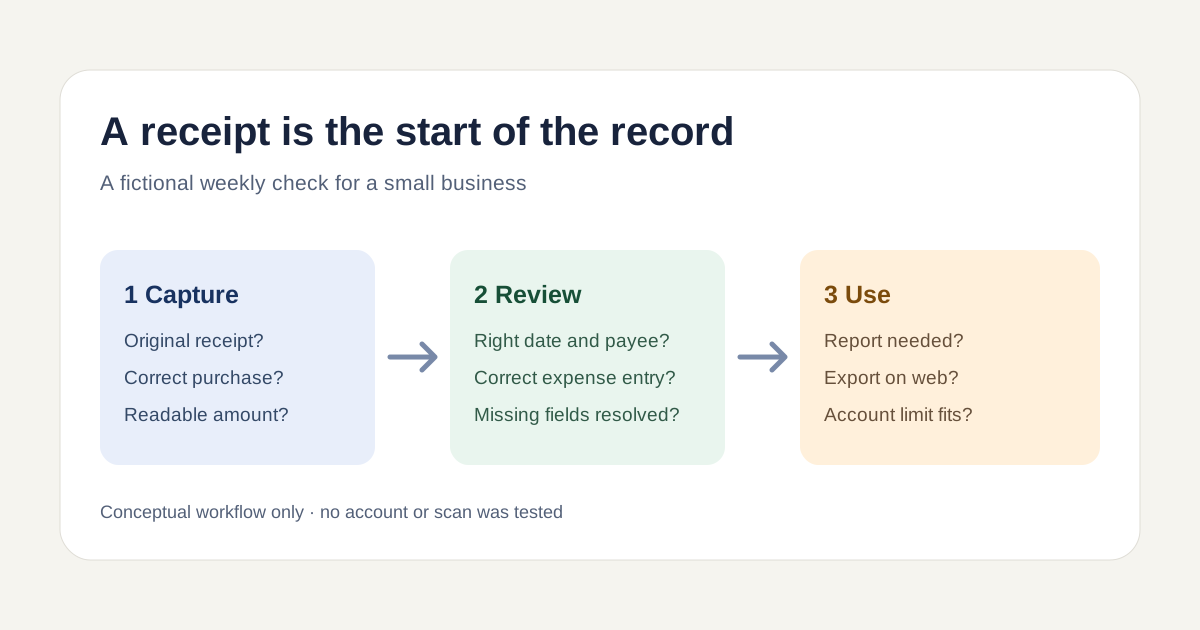
Imagine a two-person studio with a weekly batch of equipment and travel receipts. This is a fictional selection exercise, not a user case or measured result. For each item, make a card that separates four questions:
- Capture: is the correct receipt attached and readable?
- Record: do purchase date, payee, amount and owner match the source document?
- Resolution: who corrects missing or misread information before the record is used?
- Output: does someone need a report, web CSV export or a later approval?
A scan is not a verified expense record. If the amount or payee is wrong, leave the card open and correct the maintained system record. Count a monthly scanning allowance using your expected receipts per person, then check what happens beyond it. The published limits are inputs to this exercise; they are not a forecast of your business usage.
Keep receipt capture separate from document scanning and invoicing
If the task is only to create a PDF from paper, the iPhone document scanner comparison owns that decision. If you need to bill a customer, see the invoicing app comparison. An expense receipt records a purchase; it does not itself generate a customer invoice or prove a reimbursement.
Where a reusable message helps
If staff repeatedly need the same neutral instructions for supplying a missing receipt, Copied can be evaluated for a reviewed text Key inserted manually into compatible iPhone or iPad draft fields. For example: “Please add the receipt for [purchase] to our approved expense record and tell me if the date or amount needs correction.” Replace the bracketed detail, verify the recipient and use the approved system for the record.
Copied does not scan receipts, create or sync expense entries, approve reimbursements or send messages automatically. For a one-off request, write it in the current app. If this wording recurs, try one saved Key and check that it inserts correctly where your team actually drafts; the small-business app stack guide covers when an extra reuse tool is worth considering.
Make the decision with one harmless sample
List the actual users, anticipated monthly receipts per person, required report or export, and any approval or accounting requirement. Evaluate the current offer in your region with a non-sensitive sample, review the resulting record and check the complete output. Keep the existing approved process if it already meets the job; adopt a new route only after you know which requirement it satisfies.
References
- Expensify, Free Features in Expensify Personal account includes unlimited SmartScans, mobile capture/manual entry and web-only CSV export. Paid workspace required for categories, tags, automatic reimbursement and accounting integrations. No account test. Reviewed November 2, 2026.
- Zoho Expense, US pricing and plans Ongoing Free plan supports up to three users, expense reports and 5GB receipt storage. Autoscan allowance is 20 per user per month; manual entry/upload remains after quota. US offer; 14-day trial is separate; no account or receipt test. Reviewed November 2, 2026.
- Zoho Expense, Autoscan receipts help Zoho describes a mobile receipt-capture path and scanning review. Australian help article describes workflow; US pricing is separately sourced. No device test. Reviewed November 2, 2026.
- Copied, Product homepage Reusable text Keys can be inserted manually into compatible iPhone and iPad fields. No receipt scan, expense record, reimbursement, automatic send or integration claimed. Reviewed November 2, 2026.