App Reviews
Apps for Small Businesses: Choose a Useful Everyday Stack
Choose tools by the recurring jobs they own. Compare six candidates, understand their free-plan limits and build the smallest stack your working day needs.
Published , 8 min read, by Copied Editorial team
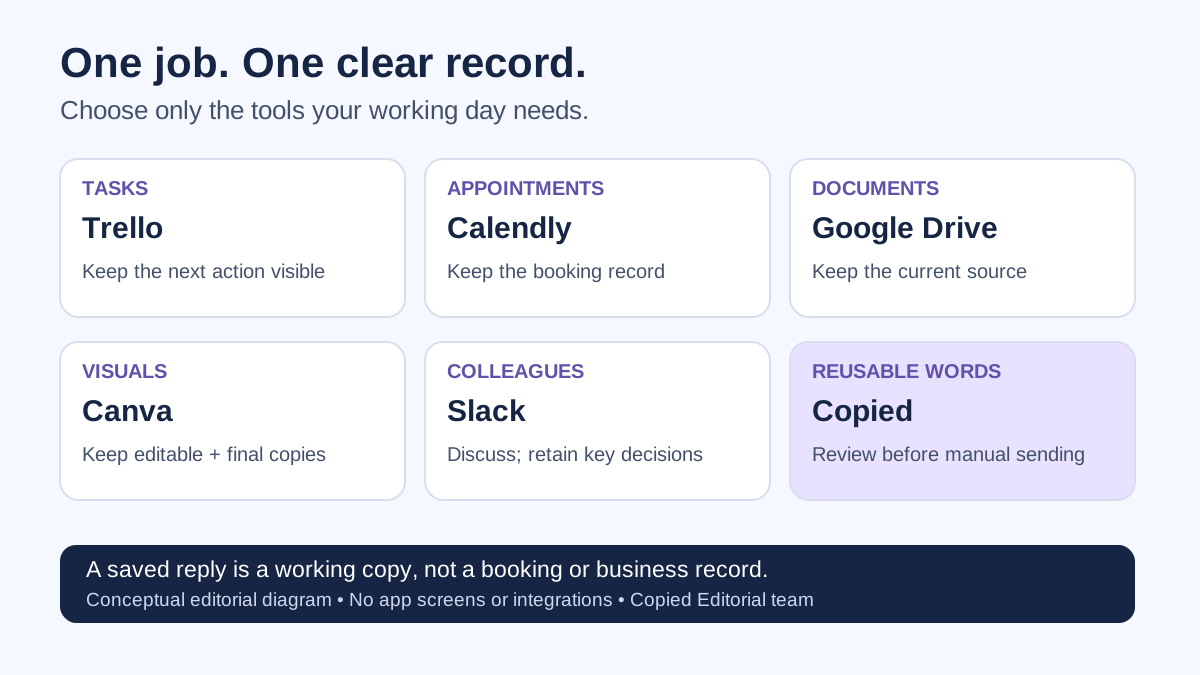
Useful apps for small businesses should each solve a recurring job: keeping work visible, arranging appointments, storing documents, making visuals, coordinating colleagues or reusing customer wording. Trello, Calendly, Google Drive, Canva, Slack and Copied are candidates for different jobs, not a ranked bundle you need to install. Start with the gap in your working day, then check the plan and device limits.
This comparison is for independent service providers, sellers and very small teams choosing everyday tools. It is not a complete accounting, payments or customer-management shortlist. Copied publishes this article and is one of the products discussed. We reviewed current official documentation on October 11, 2026; this is a documented comparison, not a hands-on benchmark or a claim that these apps integrate with one another.
Choose by job before choosing by app
Write down one task that repeatedly breaks down. Perhaps an appointment is hard to arrange, the current document is difficult to find, or you retype the same arrival instructions. Identify where the authoritative record belongs and who updates it. A saved message is useful wording; it is not proof that an appointment, policy or customer record is current.
| Recurring job | Candidate | Choose it when | Check before adopting |
|---|---|---|---|
| See work and its next step | Trello | A visible task board would clarify what needs doing. | Workspace board/collaborator limits and device support. |
| Arrange an appointment | Calendly | People need to select from your available meeting times. | Number of appointment types and connected calendars. |
| Keep current documents | Google Drive | You need one identifiable file source and controlled sharing. | Shared storage allowance, account ownership and access. |
| Create everyday visuals | Canva | A template-based design editor fits the material you make. | Whether the needed assets and features are in Free. |
| Coordinate colleagues | Slack | Several people need a place for internal conversations. | Accessible history and retention; skip it for solo work. |
| Reuse wording on iPhone or iPad | Copied | You repeatedly insert reviewed text in compatible fields. | Key allowance, paid features and keyboard compatibility. |
Trello: make the next task visible
Consider a board for work that moves through clear stages, such as to prepare, ready and completed. It is a reasonable candidate when a list no longer communicates the status of small jobs. Keep the task state here rather than creating a second competing tracker in a chat.
Atlassian's current plan guide lists up to 10 open boards and 10 collaborators in a Free Workspace, with a 10 MB limit per attachment and 250 automation runs per month. Check the Workspace totals, not just the size of your own board. A need for more boards or collaborators is a concrete reason to compare paid plans.
Trello's platform guidance covers browsers and mobile apps; its current iOS requirement is version 18.6 or later. Confirm your actual phone is supported before adopting it as a phone-first tool. If a simple existing checklist already shows the next action reliably, keep that instead.
Calendly: reduce appointment coordination
Consider Calendly when your reader needs to pick an available meeting time. That is a different job from storing the confirmation wording you send afterward. Keep the actual booking and its changes in the scheduling system.
Calendly's plan guide, updated September 1, 2026 lists one event type, one connected calendar and unlimited meetings on Free, as well as a mobile app. One appointment type can fit a straightforward introductory call. Distinct services needing separate booking options, more calendars or automated reminders may require a different plan; do not assume Free includes those features.
If appointments are occasional and a direct agreement is easy to maintain, your existing calendar may be sufficient. Evaluate scheduling against the appointment you actually offer rather than installing it because another business uses it.
Google Drive: keep a recognizable document source
Drive is a candidate for storing, organizing and sharing documents you need to find again. Google's iPhone and iPad guide describes uploading and sharing files. Use an identifiable current source for material such as your own service instructions; avoid treating a downloaded copy on another phone as automatically current.
A personal Google Account has up to 15 GB of free storage shared across Drive, Gmail and Google Photos, according to Google's storage guidance. This is not 15 GB reserved for business files and does not establish a free Google Workspace business plan. Confirm the account and storage arrangement you will use.
For a team, account ownership and who can change or access a file matter as much as capacity. Choose an arrangement you can maintain when responsibilities change. This article does not assess vendor security, regulatory compliance or business administration plans.
Canva: prepare visuals with a defined scope
Consider Canva for a flyer, service overview or other visual material when a template-based editor fits the task. Start with a concrete design and check its ingredients before choosing a plan.
Canva's current Free plan includes the design editor, a free template and asset library, 5 GB of cloud storage and one Brand Kit limited to three colors. Premium content and capabilities belong to other plans. A template appearing in the editor does not establish that every asset or feature you want is free.
Canva offers an iPhone and iPad app. Check whether the actual design is comfortable to edit on your device. Keep the editable source separate from the final version you share, and verify the final wording, dates and contact details yourself.
Slack: coordinate a small team, with history limits
Slack is a candidate when several colleagues need ongoing internal conversations. Slack's official iOS page describes its team communication purpose and iPhone app. A solo owner with no internal coordination problem may have no reason to add it.
The Free plan limitations include access to the most recent 90 days of message and file history; workspace data older than one year is deleted. Free huddles are one-to-one. These limits matter if you expect to find an old instruction or decision later.
Our recommendation is to keep an authoritative policy or durable decision in its maintained document or record, even when you discuss it in chat. A searchable conversation window is not the same thing as a permanent business archive.
Copied: reuse reviewed wording in compatible fields
Copied is relevant when an iPhone or iPad owner repeatedly needs their own instructions, links or other stable text while replying. Its published product description distinguishes reusable Keys, saved Clipboard content and Files. Text insertion is manual in fields that accept its custom keyboard. It does not send the message, manage a booking or provide a shared team workspace.
The current App Store description states that the free allowance is up to four Keys, while Copied Pro unlocks unlimited Keys and full productivity features. That Key allowance does not prove every Clipboard, Files or other feature is free. Check the offer in your own App Store and installed app before deciding on a paid workflow.
Clipboard capture depends on access while a Copied process is active; it is not uninterrupted background monitoring. Copying and pasting a file also depends on what the receiving app supports. For a small phrase-and-shortcut need, Apple Text Replacement may be enough. Choose a browsable library only when finding and reusing saved items is the job you need.
For the narrow comparison of clipboard tools, see our iPhone clipboard-manager comparison. For the ownership and review routine, see how to maintain a business reply library.
Best free apps for small business owners: check what free covers
There is no single best free stack for every owner. An ongoing free tier, a trial and a free app download are different offers. In this shortlist, Trello, Calendly, Canva and Slack publish ongoing Free plans with the limits above. Personal Google Account storage is a shared allowance. Copied declares a limited free Key allowance, not an unrestricted free productivity suite.
- Check the exact recurring job fits the free allowance, including collaborators, calendars, storage or saved items.
- Check the device you will actually use, then try your own harmless task rather than assuming full desktop and phone parity.
- Write down the requirement that would justify upgrading. If no such requirement exists, do not add a subscription just to complete a list.
- Keep numerical purchase prices and renewal decisions tied to the vendor's current offer in your region. This article does not quote paid prices.
A fictional studio owner's smallest useful stack
Imagine an independent studio owner arranging sessions and sending arrival instructions. This is an editorial illustration, not a customer result. If one appointment type and one calendar meet the owner's needs, they could evaluate Calendly's Free allowance. They might keep the current arrival instructions in one maintained document and use a simple task list for preparation.
If the owner repeatedly inserts those approved instructions on an iPhone, a Copied Key could be a personal working copy. They should update that copy when the source instructions change and review the recipient and session before sending. The booking stays in the scheduling system; the Key does not become the booking record.
Canva only becomes relevant when there is a design to create, and Slack only when there are colleagues to coordinate. Nothing in this example requires all six apps or an integration between them. For reusable documents and images, our Files guide explains supported sharing and paste limits.
Make one adoption decision
Choose one gap, one authoritative record and one realistic task to evaluate. Keep the tools you already use successfully. Add another app only when you can explain what recurring job it owns and how you will maintain the information.
If that gap is repeatedly finding and inserting your own wording on iPhone or iPad, explore Copied. Start with one harmless arrival instruction, check the available Key allowance and test manual insertion in a draft field you actually use. Review the details yourself before sending.
References
- Atlassian, Which Trello plan is best for me? Current primary publisher documentation checked by Copied Editorial team on 2026-10-11; not independent device testing. Offers and compatibility can change.
- Atlassian, What browsers and platforms does Trello support? Current primary publisher documentation checked by Copied Editorial team on 2026-10-11; not independent device testing. Offers and compatibility can change.
- Calendly, Choose the right Calendly plan for your team Current primary publisher documentation checked by Copied Editorial team on 2026-10-11; not independent device testing. Offers and compatibility can change.
- Google, Manage your storage in Drive, Gmail & Photos Current primary publisher documentation checked by Copied Editorial team on 2026-10-11; not independent device testing. Offers and compatibility can change.
- Google, How to use Google Drive, iPhone & iPad Current primary publisher documentation checked by Copied Editorial team on 2026-10-11; not independent device testing. Offers and compatibility can change.
- Canva, Compare plans Current primary publisher documentation checked by Copied Editorial team on 2026-10-11; not independent device testing. Offers and compatibility can change.
- Canva for iOS Current primary publisher documentation checked by Copied Editorial team on 2026-10-11; not independent device testing. Offers and compatibility can change.
- Slack, Feature limitations on the free version of Slack Current primary publisher documentation checked by Copied Editorial team on 2026-10-11; not independent device testing. Offers and compatibility can change.
- Slack for iOS Current primary publisher documentation checked by Copied Editorial team on 2026-10-11; not independent device testing. Offers and compatibility can change.
- Copied, Workspace Keyboard, Apple App Store Current primary publisher documentation checked by Copied Editorial team on 2026-10-11; not independent device testing. Offers and compatibility can change.
- Copied, Saved Replies, Clipboard & Files for iPhone Current primary publisher documentation checked by Copied Editorial team on 2026-10-11; not independent device testing. Offers and compatibility can change.
- Apple, Set up shorthand for frequently used text on iPhone Current primary publisher documentation checked by Copied Editorial team on 2026-10-11; not independent device testing. Offers and compatibility can change.