Guides
What to Ask a Customer to Prepare Before a Service Visit
A booked visit does not always need another message. Use a signal, ask, record check to request one useful action and avoid assuming the customer is ready.
Published , 4 min read, by Copied Editorial team
For a booked service visit, ask the customer to prepare only when a specific action would affect access or the work. State one reasonable action, give a way to say if it is difficult, and check the actual reply against the job record. If the booking already includes clear instructions or no action is needed, an extra preparation message may only create confusion.
This is a documentation-based guide for an independent service business working from an iPhone. We checked Apple, Square, Jobber and Copied's public instructions on November 16, 2026. We did not operate a vendor account, send a customer message or verify a real visit. Your booking and job record remain the source of truth.
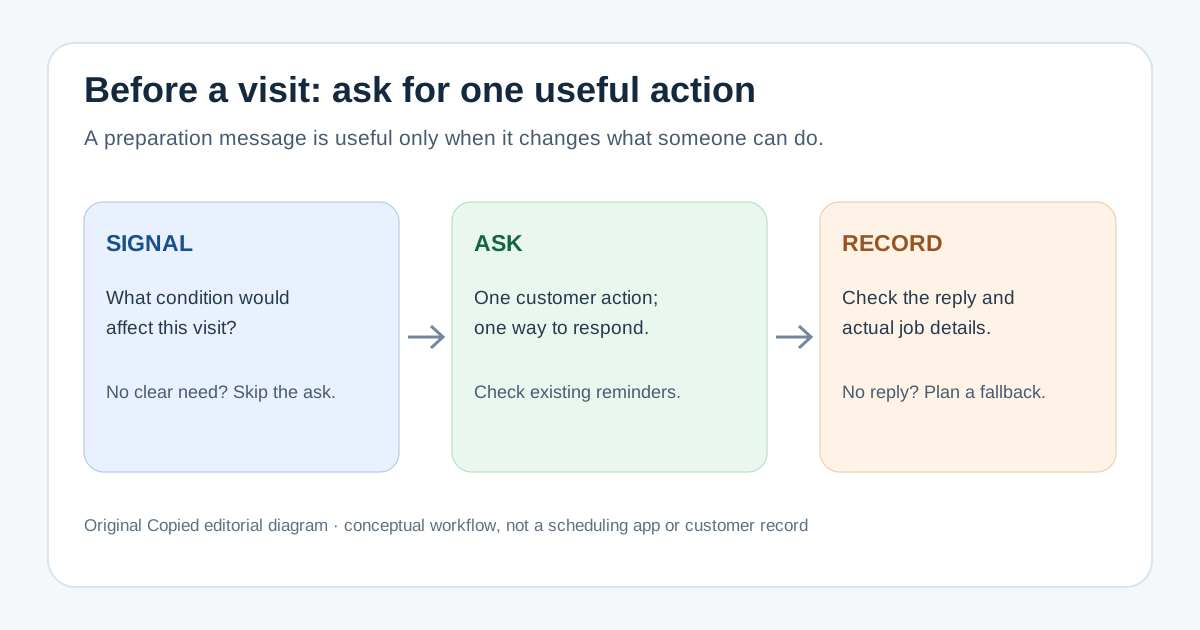
The signal → ask → record check
| Step | Question | Action |
|---|---|---|
| Signal | What condition could change access or preparation? | If none is concrete, skip the extra request. |
| Ask | What is one safe, reasonable thing the customer can do? | Name that action and an easy way to respond if it is not possible. |
| Record | What did the customer actually say? | Check the real thread and update the job record; do not infer readiness from a sent message. |
A request to make a work area accessible can be appropriate when access is needed. Asking the customer to inspect wiring, move a heavy appliance or perform hazardous work is a different matter; leave technical and unsafe tasks to the professional. Do not put door codes, personal documents or other sensitive details into a generic saved message.
First check the booking and existing reminders
Read the booked date, time window, address, contact and any notes before writing. If you only need to confirm whether the visit is booked, use our appointment confirmation guide. This guide addresses a separate question: what the customer should do before an already booked visit.
Look at any confirmation or reminder already scheduled in your appointment system. Square's appointment notification guide documents configurable text and email confirmations and reminders, subject to subscription, settings and customer preferences. Jobber's visit-reminder guide describes scheduled and manual reminders for supported accounts and warns that sending a manual reminder does not replace an automatic one. These are vendor-specific controls, not proof that your account has them enabled or that a message arrived. Check your own settings and the actual outgoing content before adding a separate note.
If the existing reminder already carries the correct preparation action, avoid sending the same request again. If it cannot hold the necessary detail, use the channel the customer expects for that booking, and make clear that the visit details have not changed. A message in iPhone Messages is one possible route; Apple's Messages guide covers composing and sending, including a send-failure alert. A sent state alone does not tell you the customer read, accepted or completed the request.
Write one action, one fallback and one reply route
- Name the booked visit in a way the recipient can recognize, after checking the correct contact and date.
- Ask for one action that is within the customer's control, without implying they must do technical work.
- Explain briefly why the action matters for access or preparation, and offer a simple response if it is difficult.
- Use the established thread or another verified route, then review the final recipient and wording before sending.
Fictional example: ‘Hi Maya, ahead of Tuesday's booked visit, could you leave the area in front of the utility closet accessible if it is easy to do? That will help us reach the equipment. If moving anything is difficult, please reply here and we will discuss access when we arrive.’ Replace the name, day, area and reason with the actual job details. This example does not establish a customer's consent, ability or completed preparation.
A more cautious alternative when the action is uncertain: ‘Before our booked visit, is there anything that might make the utility closet hard to access? A short reply here is enough. We can review it together on site.’ The question may be better than an instruction when the worker still needs to assess the space. For pre-visit images, use the separate job-photo request guide rather than adding an unneeded upload request to this message.
Check the reply and plan the visit honestly
- Check the existing thread for the customer's actual response, not only your own sent message.
- Match the response to the right visit and note a relevant access issue in the normal job record.
- If the customer cannot do the action, adapt the plan with them or assess it on site; do not mark them prepared.
- If no reply arrives, use your normal contact or visit process. Do not silently cancel, change the booking or claim confirmation.
This check does not replace a booking-system confirmation status. It also does not prove that an accessible area will remain clear when the worker arrives. If the professional will be late, the running-late message guide covers that different update.
Where Copied fits
Copied's product page describes reusable text Keys that a person can insert manually in compatible iPhone and iPad text fields. If you often make the same kind of preparation request, a neutral Key can hold the one-action structure. Check the real booking, personalize the action and response route, review the recipient, and send yourself. Copied does not know whether a visit is booked, inspect reminders, send automatically, track replies or update Jobber or Square. Some apps and secure fields do not allow a third-party keyboard.
If repeated wording is the part you want to evaluate, review Copied for iPhone and iPad and try one carefully edited Key in a compatible field. Keep scheduling, customer consent and the job record in the tools that actually handle them.
References
- Apple Support, Send and reply to messages on iPhone Messages composition, sending and send-failure alert; Apple; checked Nov16, 2026; no device or delivery test.
- Square Support, Manage appointment booking notifications and reminders Configurable text/email booking confirmations and reminders subject to subscription, settings and preferences; Square; checked Nov16, 2026; no account/delivery test.
- Jobber Help Center, Assessment and Visit Reminders Supported scheduled/manual reminders; manual reminder does not replace scheduled one; Jobber updated Nov12, 2026, checked Nov16; no account/delivery test.
- Copied, product homepage Publisher-declared manual Keys insertion in compatible iPhone/iPad fields; no appointment integration, automation or reply tracking; checked Nov16, 2026; no native app test.