App Reviews
Square Appointments vs Acuity Scheduling for Booking Deposits
Choose a deposit workflow by the person who books, the plan you can use and the steps after a cancellation.
Published , 5 min read, by Copied Editorial team
For a US service business that wants a partial payment when a client books online, start by evaluating Square Appointments if its existing payment setup fits: Square documents appointment deposits on its ongoing Free plan, with processing fees when you take payment. Evaluate Acuity Scheduling if its separate booking setup and connected payment processors suit your operation; its free access is a seven-day trial, not an ongoing free plan. The decisive check is how your business handles bookings made by staff, cancellations and refunds.
This comparison uses the vendors’ official US-facing documentation reviewed November 3, 2026. We did not create accounts, take a deposit, or test either app. Plan availability, processor terms and fees can change; check your actual account before adopting a payment policy. This is a software-selection guide, not legal or financial advice.
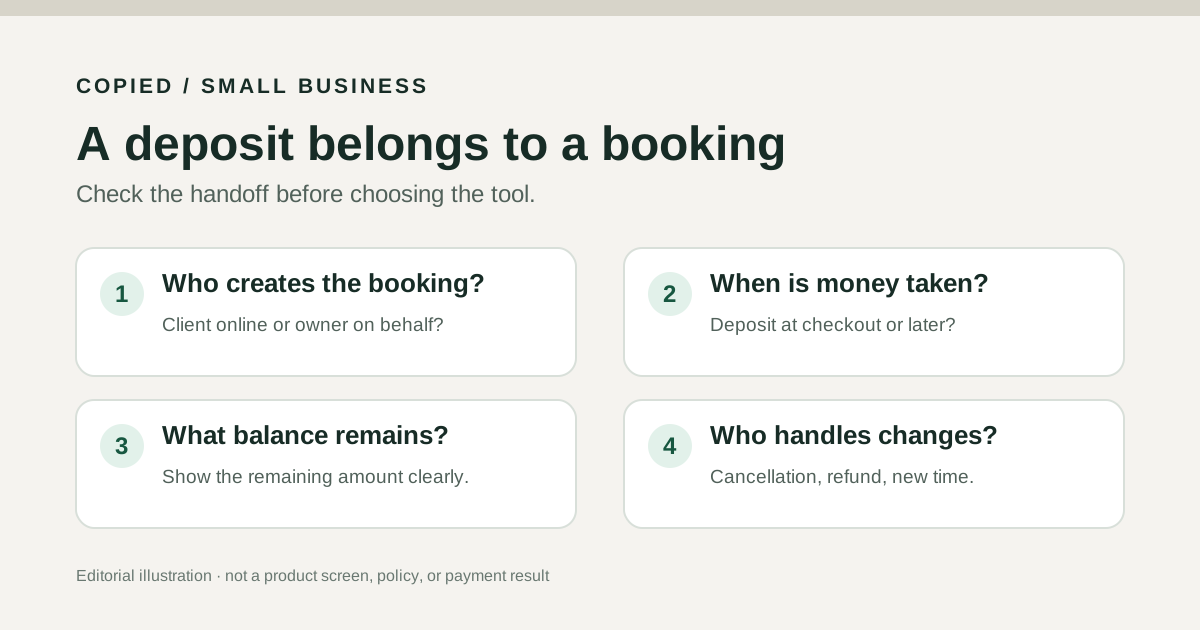
Compare the deposit handoff, not just the booking page
| Decision | Square Appointments | Acuity Scheduling |
|---|---|---|
| Where the deposit starts | Partial payment when the client books online; Square says the seller cannot take a deposit while booking for the client. | Payment at Booking can require a fixed amount or percentage after a processor is connected. |
| Ongoing plan | US Appointments Free supports deposits; no monthly subscription charge, but payment processing fees apply. | No ongoing free scheduling plan; seven-day trial, then a paid plan. Starter includes one calendar. |
| Changing or canceling | After a paid deposit, the client can reschedule before the cutoff but cannot cancel the booking themselves; the seller handles cancellation. | The owner issues any refund in the connected processor; Acuity says processor refunds do not appear in its reports. |
| Phone administration | Square documents deposit setup on iOS as well as its Dashboard. | Acuity documents payment-option settings in its Admin mobile app as well as on the web. |
The key distinction is operational: a deposit is money collected at booking, while holding a card for a possible no-show fee is a different policy. Square’s US deposit guide and Acuity’s payment-options guide describe the deposit controls. Neither source proves that a particular customer’s payment succeeded.
Square: a client-online deposit path on Free
Square’s US help says appointment deposits are available to Appointments Free, Plus and Premium subscribers. You can choose a fixed amount or percentage for all eligible fixed-price services or selected services. The deposit policy appears in the customer’s online checkout. Square also documents setup on iOS. Its important limit: it does not currently collect a deposit when you create the appointment on the customer’s behalf. If staff commonly book by phone, test that exact handoff before choosing Square for deposits.
Square’s US pricing page says Square Free has no monthly subscription cost and that processing fees apply when you take payment. “Free” does not mean a deposit transaction has no fee. The deposit guide also says an appointment with a deposit cannot use Invoices as the checkout method or be checked out on mobile in Offline Mode. These boundaries matter for a team that changes where and how it closes a booking.
For cancellations, Square says customers who have paid a deposit can reschedule before the configured cutoff but cannot cancel the appointment themselves. The seller cancels it and can offer a refund during that action; later refunds can be made through the transaction record. Decide and publish the business’s own clear policy before collecting money. The software control does not decide whether a refund is legally due.
Acuity: connected processor and paid scheduling plan
Acuity’s payment settings begin after you connect a payment processor. Payment at Booking can require full payment, a set deposit amount or a percentage. You can apply one rule across appointments or set it by appointment type; the Admin mobile app exposes these settings. This makes the intended checkout rule explicit, but the selected processor still owns the transaction.
Acuity’s pricing page lists a seven-day trial and says there is no ongoing free scheduling plan. Its paid Starter plan includes one calendar and payment/deposit support. If you need several staff or location calendars, inspect the current higher-plan capacity and cost rather than assuming a trial feature remains available on Starter.
Acuity’s refund handoff deserves a test with your chosen processor: its refund guide says you cannot issue a refund inside Acuity. A canceled paid appointment produces a link to the processor payment, where you issue the refund. The refund is not reflected in Acuity reports. If reconciling refunds in one screen is essential, this is a material limitation to evaluate.
A four-check booking card for a fictional studio
Imagine a two-person portrait studio taking a partial payment for a session. This is a fictional decision exercise, not a customer story or measured result. Write down four facts before comparing plans:
- Who creates the booking: the client online, or a staff member after a phone call?
- When is the partial payment collected, and what does the customer see before confirming?
- Where will staff verify the remaining balance without treating a booking confirmation as payment proof?
- Who changes the appointment and handles a cancellation or refund in the payment processor?
If the studio relies on staff-created bookings, Square’s documented online-only deposit path is a reason to inspect an alternative workflow. If the studio chooses Acuity, it must assign someone to reconcile processor refunds outside Acuity reports. Neither conclusion says one product is universally better; the card exposes the handoff your team must actually operate.
Keep policy wording separate from the payment system
The booking platform remains the source of truth for appointment and payment status. If you repeatedly draft the same approved deposit-policy explanation from an iPhone or iPad, Copied can hold reviewed text for manual insertion in compatible fields. For example: “Your booking page shows the deposit and remaining balance before you confirm. Please review our cancellation terms there.” Check the actual page and recipient each time. Copied does not create the booking, take payment, send reminders, connect to Square or Acuity, or enforce a refund policy.
For a general booking-page decision without deposits, see our Calendly versus Google Calendar appointment-schedules guide. For reusable checkout links independent of a scheduled service, see Stripe versus PayPal payment links. If reviewed policy wording is the repeated phone task, learn what Copied does at the Copied homepage before deciding whether its manual text library fits.
References
- Square, Set up and accept deposits with Square Appointments (US) Online deposits in Free/Plus/Premium; client online-booking requirement, policy, setup and cancellation/refund restrictions. Checked November 3, 2026; no account test.
- Square, Appointments pricing and plans (US) Square Free has no monthly subscription cost; payment processing fees apply. Checked November 3, 2026; offers may change.
- Acuity Scheduling, Choosing how clients pay for appointments Connected processor required; fixed or percentage deposits, full payment and mobile admin settings. Checked November 3, 2026; no account test.
- Acuity Scheduling, Pricing plans and features No ongoing free scheduling plan; seven-day trial; paid Starter one calendar and payment/deposit support. Checked November 3, 2026; offers may change.
- Acuity Scheduling, Handling refunds and price adjustments Refunds are handled by the connected processor rather than Acuity and do not appear in Acuity reports. Checked November 3, 2026; no transaction test.
- Copied, product homepage Reusable text Keys for manual insertion in compatible iPhone/iPad fields. Checked November 3, 2026; no booking or payment integration claimed.