Guides
How to Reply to a Customer Order Cancellation Request from iPhone
Acknowledge an order cancellation request, verify the merchant decision and downstream fulfillment and refund states, then reply with the outcome you can substantiate.
Published , 4 min read, by Copied Editorial team
A customer asks you to cancel an order while you are away from the desk. Their message starts a review; it does not cancel the order. Even after the merchant record says canceled, a fulfillment partner may still be acting on an accepted request, and a refund may have a separate status. Reply according to the state you have verified, not the state you hope to reach.
This guide is for a small US online-store owner handling a post-purchase request from an iPhone. We reviewed official Shopify and Copied information on November 20, 2026. We did not access a merchant account, cancel an order, issue a refund, contact a fulfillment service, send a notice or test the Shopify iPhone app. Your store policy, provider settings and applicable obligations govern a real case.
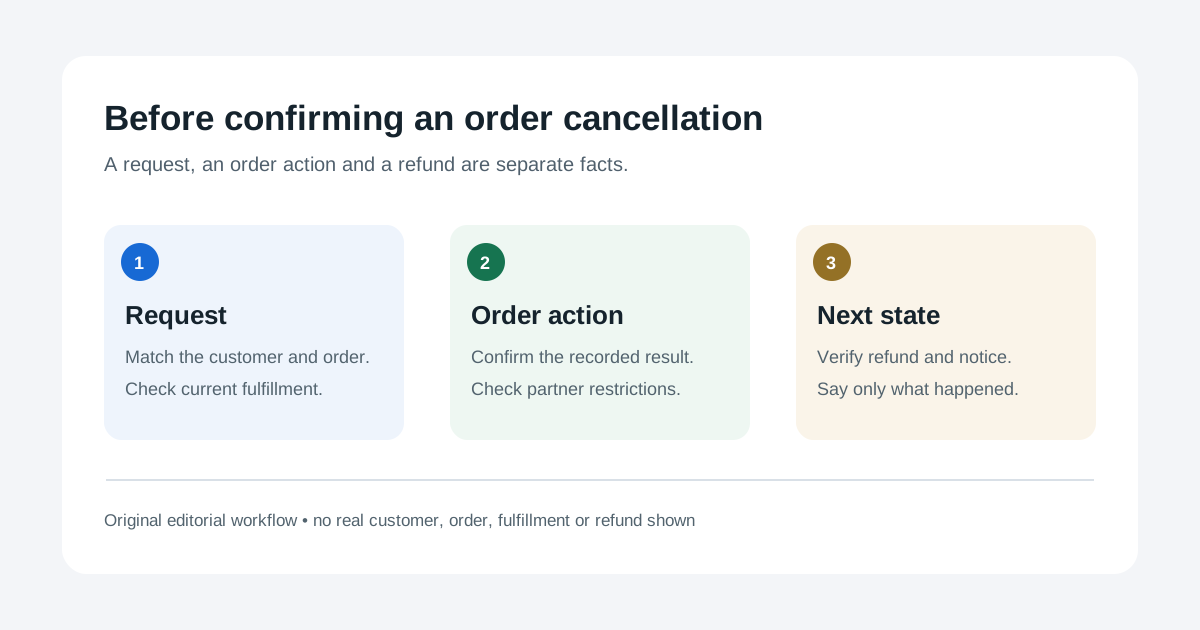
Keep the request, cancellation and downstream outcome separate
| State | What you can say | What remains to check |
|---|---|---|
| Request received | You are reviewing the customer's request | Correct order, authorization and eligibility |
| Merchant order canceled | The merchant record shows cancellation | Accepted fulfillment request and the chosen payment action |
| Downstream outcome checked | Describe the recorded partner response, refund action and notice state | Any unresolved step and who owns it |
Shopify's cancellation guide explains that permissions, payment status, fulfillment status and an external fulfillment service can affect cancellation. It presents different payment actions, including a refund to the original method, store credit where available and a refund later. A request alone does not select any of them.
Check the order before giving a final answer
- Match the sender with the correct order through your store's supported verification process. Check the current order status, payment state, fulfillment status and prior customer messages. Do not use a forwarded screenshot alone as authority to cancel.
- Review your cancellation policy and the platform's current eligibility and permissions. If the action is unavailable in your phone workflow, use the authorized merchant admin route or ask a colleague with the required access. Do not assume a mobile cancel control from a desktop help page.
- If a fulfillment service has the order, inspect its request state. An unaccepted request and a service-accepted request have different cancellation paths. For an accepted request, ask through the supported service route and wait for its response before saying that fulfillment stopped.
- After an authorized cancellation, reopen the merchant order and inspect the actual record. Check which payment action was selected and its recorded state. A canceled order is not evidence that money has reached the customer.
- Review the customer notification setting and the order's communication record. A configured or selected notice is not proof that the customer received it. If the native notice already communicates the correct outcome, avoid a conflicting duplicate.
Shopify's app-fulfillment guide distinguishes cancellation of an unaccepted request from requesting that an accepting service cancel its work. Changing a merchant status alone does not stop that service. Shopify's notification guide documents order-canceled and refund notices and per-action notification choices. Check the record for this order rather than assuming a message was delivered.
Write the response for the state you can verify
While the decision is pending, acknowledge the request and give the next check. If cancellation was declined or blocked, explain the concrete reason you can disclose and the supported next step, without claiming a refund or stopping a shipment. If the merchant order is canceled but partner or payment work is open, state that narrower result and say what is still being checked. Only describe a refund as issued when the payment record supports that wording; do not invent a posting date at the customer's bank.
Fictional pending reply: ‘Hi Alex, I received your request to cancel order [reference]. I am checking its current fulfillment and payment status before confirming what we can do. I will update you through our usual order contact channel once the review is complete.’ Replace the placeholder, verify the recipient and adapt the next step to the real order. This acknowledgment does not say that cancellation or a refund has happened.
- Keep the customer name, order number, payment details and final decision in the live order and message workflow, not in a reusable template.
- If the order has shipped and the customer instead wants to return it, see the separate return-request guide.
- If the customer's question is where a dispatched parcel is, see the order-tracking guide.
Where Copied fits
Copied's product page describes reusable text Keys that a person can insert, review and personalize in compatible iPhone and iPad text fields. A Key could hold stable acknowledgment wording while you inspect the order. Add the current order reference, decision, payment status and next step yourself for each message. Copied has no Shopify, payment or fulfillment integration; it does not cancel orders, check refunds or send messages automatically. Some apps and secure fields do not accept third-party keyboards.
Use your store's native tools for the actual order action and record. If a reviewed starting draft would help repeated follow-ups, check whether Copied fits your iPhone or iPad workflow.
References
- Shopify Help Center, Canceling orders Cancellation eligibility, permissions, payment and notification choices; mobile section documents archiving, not a cancel action. Official Shopify; checked Nov20, 2026; no order test.
- Shopify Help Center, Fulfilling orders using a fulfillment service with an app Unaccepted versus accepted service cancellation paths; merchant status alone does not stop the service. Official Shopify; checked Nov20, 2026; no service test.
- Shopify Help Center, Setting up customer notifications Order-canceled and refund notification settings and per-action options; no delivery proof. Official Shopify; checked Nov20, 2026; no message test.
- Copied, product homepage Manual reusable Keys in compatible iPhone/iPad fields; no merchant/payment integration. Checked Nov20, 2026; no app test.