App Reviews
iMovie vs CapCut on iPhone for a Small Business Promo Video
Choose an iPhone video editor by the clips you own and the file you can actually export. Compare guided storyboards with templates and paid-asset checks.
Published , 5 min read, by Copied Editorial team
Choose iMovie if you want a guided shot list or a simple edit from clips you already filmed, with a Free iPhone app. Consider CapCut when a mobile template or more effects suit the promo, but inspect every selected asset and the export screen before treating the finished video as free. Both can help assemble a short clip. The useful comparison is the path from your footage to a reviewed file you can actually post.
This is a documentation-based choice for a small business owner making a short promotional video. We reviewed Apple and CapCut's official pages on November 4, 2026. We did not edit or export a video in either app, test an account, purchase a plan, or measure production time or results. Template availability, export controls and offers can change by region, device and app version.
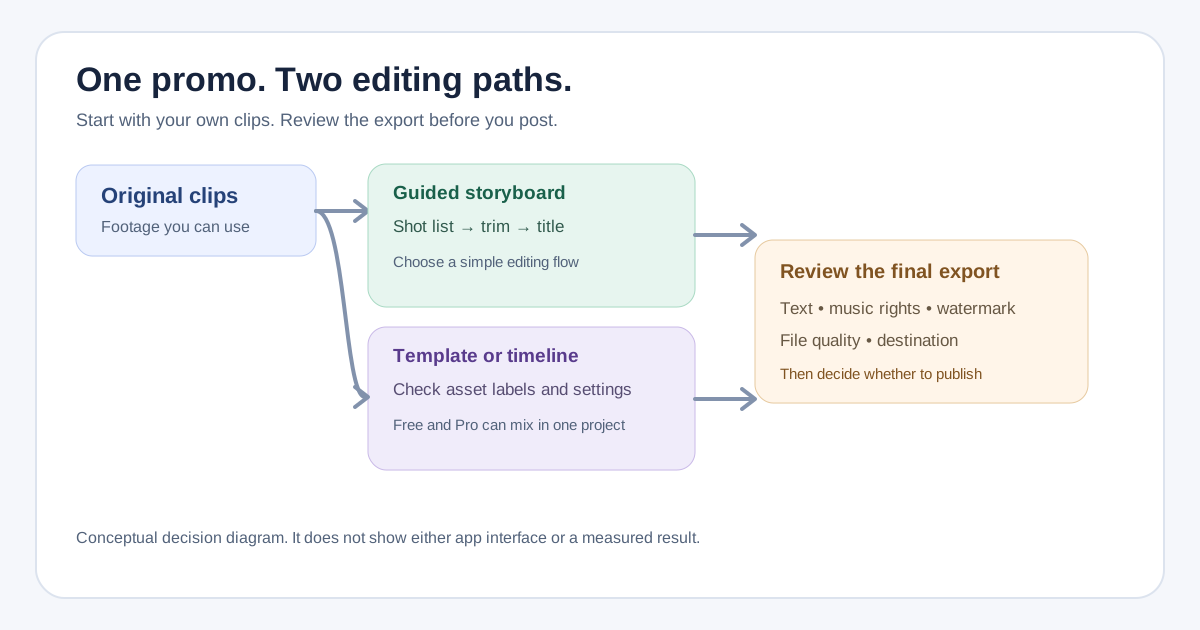
Decide what the video must show before opening an editor
Imagine a fictional mobile bicycle-repair business with three original clips: the technician arriving, a brief repair detail and the finished bike. The owner wants a 20-second promo that states a real service area and asks viewers to request an appointment. This is an editorial exercise, not a customer story or evidence of sales. Write down the destination, shape, exact offer text, person approving it and the exported file you need.
That brief changes the app decision. If the main problem is deciding which shots to capture and their order, a storyboard is worth evaluating. If the owner already has the sequence and wants to compare visual treatments, a template may be useful. In either case, use footage and audio you have permission to publish, check for identifiable customers, and watch the exported file rather than relying on the editor preview.
| Decision | iMovie on iPhone | CapCut on iPhone |
|---|---|---|
| Starting route | A guided Storyboard, Magic Movie or a manual movie project using your clips. | A mobile template or manual timeline; available templates vary by region and version. |
| Ongoing free offer | Apple lists the app as Free. | CapCut lists a Free tier with basic editing; its App Store listing also says In-App Purchases. |
| Cost check | Confirm the chosen export setting works with your media and device. | Check template and asset labels, then the export prompt for Pro requirements or watermark conditions. |
| Approval point | Open the saved video and check the actual message and file. | Open the exported video and check the actual message, branding and file. |
iMovie: use the shot list when the story is still loose
Apple's iMovie App Store listing labels the iPhone and iPad app Free and describes Storyboards, Magic Movie, titles, clip rearrangement and saving a completed video to Photos. Apple's storyboard guide describes a premade shot list with placeholders, titles, transitions and music. That can help the bicycle-repair owner notice a missing closing shot before spending time polishing effects.
A storyboard is a starting structure, not a promise that it knows the business's service area, price or rights. Replace its generic wording with the approved facts and trim the sequence for the intended destination. A manual movie project is another route when the owner already knows the order. Apple lists high-resolution export options with device conditions, so check the actual setting available for the source footage and iPhone rather than promising a fixed resolution for every project.
CapCut: separate a usable free edit from premium ingredients
CapCut's iPhone App Store listing says Free with In-App Purchases. Its plan comparison describes an ongoing Free tier with basic editing and places premium templates and features in Pro. A free download is therefore not evidence that a chosen template, effect, music track or export setting is included.
CapCut's mobile-template guide describes selecting a template, replacing its media and previewing the edit. It also says the Template control can be absent in a region or app version. For the fictional promo, start with the owner's own clips, inspect the template's labels and make a harmless draft before building a campaign around a specific layout. A manual timeline is a reasonable alternative if the preferred template is unavailable or paid.
CapCut's export guidance says Pro elements or settings can trigger a subscription prompt when exporting. Its watermark guidance describes cases where an edit made with standard tools and free assets can export without a watermark. Those statements are conditional: the asset mix, settings, region and version matter. Do not assume that all free exports carry a watermark, or that every template produces a clean free file. Check the actual exported result on the phone before choosing a plan or posting.
Run one harmless export preflight
Try both routes with the same short set of owned sample clips and fictional text. This is a suggested evaluation, not a test we performed. Record the result for the exact device, app version and account you would use. A usable editor is the one whose real output meets the job within terms you accept.
- Confirm the footage, any people shown, soundtrack and graphics are cleared for the intended business use; an app's built-in asset is not automatically permission for every use.
- Check the on-screen service area, offer, contact detail and call to action against the approved wording.
- Inspect template and effect labels before editing, then read any purchase or watermark prompt at export without starting a trial by accident.
- Open the exported file, watch it to the end, and check orientation, sound, legibility, branding and the destination's upload requirements.
The preflight also prevents a common comparison mistake: judging one app by its editing screen and the other by an actual file. If a current editor already makes the approved promo reliably, there is no need to move a video library merely to make an app shortlist.
Keep repeatable caption text separate from the video edit
If the business posts a series of similar promos, it may reuse an approved caption or call-to-action sentence. Copied can keep that reviewed text as a Key for manual insertion in a compatible iPhone or iPad posting draft. Replace any date, service area or offer before posting. Copied does not edit the video, connect to iMovie or CapCut, remove a watermark or publish a post automatically. For a still flyer or service sheet, use our Canva versus Adobe Express comparison; for a recorded client update, see Loom versus Zoom Clips.
Choose the editor after one real export preflight. Keep the approved file and wording together in your own release record, then publish through the destination you selected. That closes the gap between a promising template and a video the business is ready to show.
References
- Apple, iMovie App Store listing Free iPhone/iPad app; Storyboards, Magic Movie, editing and export features. Publisher Apple; individual author/date not stated. Checked November 4, 2026; listing only, no device test.
- Apple Support, Create a storyboard project in iMovie on iPhone Guided shot lists with placeholders, titles, transitions and music. Publisher Apple; individual author/update date not stated. Checked November 4, 2026; no project test.
- CapCut, iPhone App Store listing Free download with In-App Purchases on iPhone/iPad. Publisher Bytedance Pte. Ltd.; individual author/date not stated. Checked November 4, 2026; no account test.
- CapCut, Pricing Ongoing Free tier includes basic editing; premium templates/features are in Pro. Publisher CapCut; author/update date not stated. Checked November 4, 2026; mobile prices and entitlements may vary.
- CapCut, How to Use and Export Templates Mobile template flow and region/version availability. Publisher CapCut; author/update date not stated; page references January 2026. Checked November 4, 2026; no app test.
- CapCut, Why Am I Prompted to Join Pro When Exporting? Premium elements or settings can prompt payment at export. Publisher CapCut; author/update date not stated. Checked November 4, 2026; exact account behavior untested.
- CapCut, Export Videos without a Watermark Manual editing with standard/free assets can sometimes export cleanly; template, settings and version affect result. Publisher CapCut; author/update date not stated. Checked November 4, 2026; not a universal guarantee.
- Copied, product homepage Reviewed text Keys for manual insertion in compatible iPhone/iPad fields. Publisher Sharply Labs; individual author/update date not stated. Checked November 4, 2026; no video editor integration or automatic posting claimed.