App Reviews
Asana vs ClickUp for Recurring Client Follow-Ups
Choose a recurring client task by its trigger, owner and plan limits. A task reminder is separate from the message sent to a client.
Published , 5 min read, by Copied Editorial team
Choose Asana when a simple repeating task that creates its next occurrence after completion fits a one- or two-person workflow. Choose ClickUp when you need to decide whether a task should recur when done, when closed or on a selected schedule. Both have ongoing free plans, but their team and storage limits differ. In either app, a recurring internal task is a prompt for a person to review the client and send a separate message; it is not an automatic client follow-up.
We reviewed official vendor documentation on November 3, 2026. We did not open accounts, configure a recurring task, observe notifications or send messages in either app. The example below is fictional. Check the controls and current plan shown in your own account before relying on a cadence for client work.
Start with the trigger for the next task
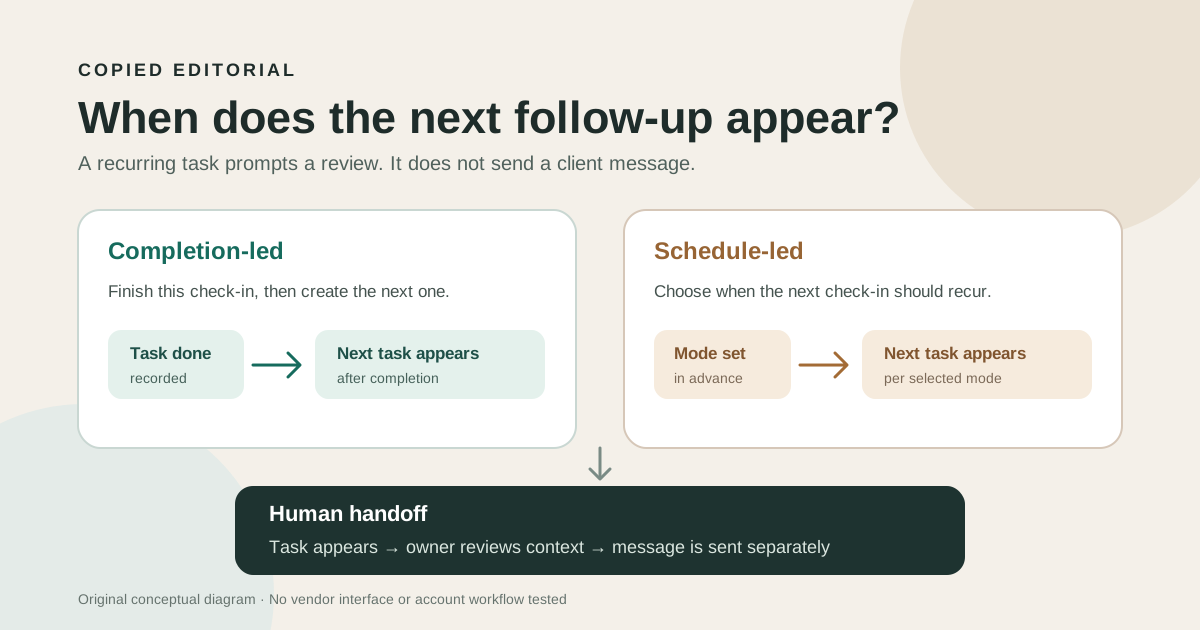
A recurring task can mean two different things. A completion-led cycle waits until someone finishes this week's work before the next item appears. A schedule-led cycle can surface the next due item based on a date. For a follow-up that must happen whether or not the previous one was finished, this distinction matters more than a long feature list. Assign a person to check what actually happened before marking any client contact complete.
| Decision | Asana | ClickUp |
|---|---|---|
| When the next item appears | After the current recurring task is completed. | The selected recurrence mode can use completion, a Done/Closed status, or a schedule. |
| Future visibility | The next occurrence appears on the calendar, rather than every future repeat. | The recurring task is available on every plan; displaying all future occurrences in Calendar requires a paid plan. |
| Free-plan boundary | Personal is free for the owner and one teammate on current accounts; check legacy-account terms. | Free Forever allows unlimited tasks and free members, with 60 MB workspace storage. |
| Client message | A person reviews and sends it separately. | A person reviews and sends it separately. |
Asana: complete this task before its successor appears
Asana's recurring-task guide says completing a repeating task duplicates it for the next due date. The next occurrence, rather than an entire run of future tasks, appears on the calendar. A periodic interval is based on the last completion date. That can suit work where the next review follows a completed client check-in; it can be a poor assumption if you need a separate task to arrive on a fixed date while the current one remains open.
Asana says fields, including subtasks, copy to the new task, while task comments do not. Put durable instructions in the task body or a maintained source, and review any client-specific details before reusing them. Asana also warns against setting both a repeating parent and repeating subtasks, which can create excessive duplicates. A recurring task is different from paid workflow rules and does not prove an external message was delivered.
Asana's schedule-template page explicitly includes recurring tasks on its ongoing free Personal plan for you and one teammate. Its Personal-plan details list two seats for current accounts, unlimited tasks/projects and list, board and calendar views; older accounts may have different seat terms. Starter is the plan to evaluate if more people or paid workflow features are needed. Do not treat a free trial of those extras as the permanent Personal feature set.
ClickUp: select the recurrence mode deliberately
ClickUp's recurring-task help says recurrence is available on every plan. Its options distinguish When complete, When done and On schedule, and let you create a new task or reuse the existing one. With reuse, prior activity and checked items can remain on the task; with a new task, review which fields are copied. This is a real choice about the record your team will review next week, not a speed contest.
A schedule setting still needs a careful status check. ClickUp's documentation says that closing a recurring task before its due date can make it recur immediately; it also notes early Done or Closed behavior for On schedule. If a fixed weekly appearance is essential, try a harmless sample with the exact status your team uses, then inspect the next instance. The same help says all future recurring tasks become visible in Calendar on a paid plan. Do not promise that Free Forever shows a complete future calendar.
ClickUp's pricing page describes Free Forever as an ongoing plan with unlimited tasks and free members. It lists 60 MB of workspace storage, while its AI access is a trial or metered offer rather than a general free entitlement. The storage help clarifies that attachments and certain uploaded media count toward workspace storage. If your follow-up task regularly carries client files, inspect the remaining space and the access controls in the plan you will use.
A fictional weekly client check-in
Imagine a two-person design studio that promises to review a client's open questions each Thursday. This is a decision exercise, not a customer story or a measured outcome. Write down the task owner, the intended review date, the source of current client facts and the channel used for the final reply.
- If Thursday arrives before last week's check-in is marked complete, should a separate review task appear anyway? Compare that expected behavior with each app's recurrence mode.
- If the owner completes the task late, should the following due date move with completion? Asana's periodic recurrence uses the completion date; verify the specific repeat pattern you select.
- If the task contains a draft response or attachment, which parts should carry forward and which client-specific details must be rewritten?
- After the task appears, who checks the actual client record, sends the message in the approved channel and records that it was sent?
These questions make a small pilot more informative than a generic feature score. Test with a fictional task and no private client data. A task created, copied or marked complete is not evidence that the client received anything. If one person just needs a native personal reminder, our Apple Reminders versus Todoist guide covers that simpler choice. For a broader project workspace, see Trello versus Notion.
Keep the message under human control
The task system should remain the record of who needs to act. If you repeatedly type the same approved opening or next-step wording on an iPhone or iPad, Copied can hold a reviewed text Key for manual insertion in a compatible draft field. Replace client-specific details, check the recipient and send through the chosen communication app. Copied does not connect to Asana or ClickUp, create their tasks or send the follow-up automatically. Its product overview explains the separate text-reuse job.
Choose the recurrence rule you can explain to the person responsible, verify it with a harmless sample and put the client-message check after the task. That gives you a clear next step even when a plan, due date or account setting changes.
References
- Asana, Schedule tasks and recurring tasks Completion creates the next recurring task, next calendar occurrence only, copied fields except comments. Checked November 3, 2026; documentation only.
- Asana, Personal plan details Current Personal plan two seats, unlimited tasks/projects and basic views; legacy accounts may differ. Checked November 3, 2026.
- Asana, Schedule template and Personal availability Asana explicitly says recurring tasks are available on free Personal for the owner and one teammate. Checked November 3, 2026.
- ClickUp, Use recurring tasks All-plan recurring tasks, mode/status behavior, new versus reused task, paid future-calendar visibility. Checked November 3, 2026; documentation only.
- ClickUp, Pricing and Free Forever Free Forever ongoing, unlimited tasks/members, 60 MB workspace storage; AI trial separate. Checked November 3, 2026.
- ClickUp, Workspace storage limits Free Forever 60 MB workspace storage includes attachments and certain media. Checked November 3, 2026.
- Copied, product homepage Optional reviewed text Keys and manual reuse in compatible iPhone/iPad fields; no task-manager integration or automatic send. Checked November 3, 2026.