WhatsApp Business
Share a WhatsApp Business Catalog Item Link from iPhone for a Client Enquiry
When a customer asks about one product or service, send its current catalog item link with a useful human answer rather than making them search the whole catalog.
Published , 4 min read, by Copied Editorial team
A customer asks about one service in WhatsApp Business. A link to that specific catalog item gives them a focused place to review it; a link to the entire catalog makes them find it themselves. WhatsApp's iPhone help describes sharing a product or service directly in a chat and copying its item link from Catalog Manager: WhatsApp's iOS sharing help. The link is a starting point for a personal reply, not a confirmation of stock, booking or purchase.
We checked WhatsApp's published iPhone catalog and sharing instructions and Copied's product description on November 8, 2026. We did not set up a business account, create an item, send a customer message or test a link on a device. Menu labels and account availability can change. Check the current controls and the customer-facing result in your own account before relying on this workflow.
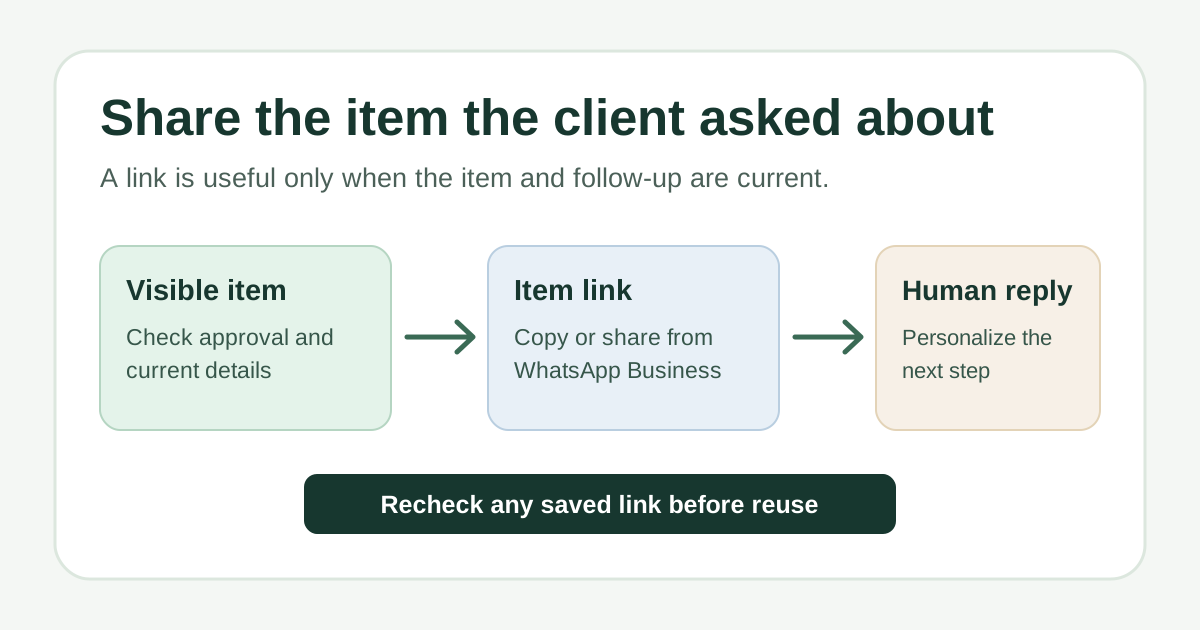
Check the item before you copy its link
Open WhatsApp Business on iPhone and find the product or service in your catalog. Make sure it is the exact item the client requested, with the current description, media and any price or availability you choose to show. WhatsApp says catalog items are visible to customers only after approval; pending or rejected items are not visible. It also offers a way to hide an item: WhatsApp's iOS catalog help. An item appearing in your editor does not, by itself, prove a customer can open it.
- Check that review is complete and the item is visible, not hidden.
- Read the customer-facing details for stale prices, dates, variations or conditions. Do not infer that the link alone updates the client about changing stock or availability.
- If the item is unavailable or awaiting approval, answer the question in the chat instead of sending a link you cannot verify.
Share one item directly in the WhatsApp chat
- Open the relevant customer chat in WhatsApp Business and use the add or attachment control to choose the catalog/storefront option.
- Choose the specific product or service, inspect the selection, then send it to that chat using the app's current send control.
- Add a separate human message that answers the client's actual question and gives one next step. Review the recipient and item before sending.
The direct-chat path follows WhatsApp's iPhone instructions. It suits a one-off enquiry when the customer is already in WhatsApp. If the chat control or wording differs on your installed version, use the corresponding catalog sharing control shown in your app. Do not treat this as a bulk-send or automated follow-up process.
Copy the item's link for email or another channel
WhatsApp's iOS Help also describes a Catalog Manager route: open Settings, then Business tools and Catalog; choose the item and its More or sharing control, then use Share or Copy link. The exact path can differ with the current app interface. Its item links are generated automatically and cannot be customized: WhatsApp's catalog-link guidance. Copy the individual item's link, not the general catalog link, when the client asked about one offering.
Paste the link into your intended message and open it yourself before sending. Confirm it points to the intended item and shows information you are willing to stand behind. A copied URL can be reused across a compatible text field, but the customer may see it later; an old link should never substitute for checking the current item.
Answer the client's question beside the link
For a fictional bike-repair shop, a useful reply might read: ‘Here is the catalog page for the brake inspection you asked about: [current item link]. It explains what the inspection covers. If you tell me the bike model and the issue you noticed, I can confirm the appropriate next step.’ This is illustrative copy, not a tested message or a promise about price, capacity or response time. Replace every detail with facts from your business, and ask only for information needed to help.
A link without context can leave the original question unanswered. A short answer and a clear next step help the client understand why you sent the item. If the decision needs a quote, appointment or suitability check, say what you will verify rather than imply that a catalog page settles it. For reusable human wording in WhatsApp, see the client-reply guide.
Recheck saved links when an item changes
A saved item URL is convenient, but it is not a live catalog status check. Reopen the item before reuse when its price, availability, media or terms change, or when it is hidden, rejected or removed. If you cannot confirm the customer-facing page, copy a fresh link from a visible approved item or reply without the link. WhatsApp's catalog visibility guidance explains why approval and hiding matter; the check-before-reuse rule is our editorial recommendation.
For one chat, WhatsApp Business already has the necessary sharing path. If you repeatedly use the same reviewed item link and accompanying wording in email or other compatible fields, Copied's published product description describes saving text as a Key and inserting it manually on iPhone or iPad. You still need to verify the link, personalize the reply and choose to send it. Copied does not read or sync your WhatsApp catalog, check item approval, update a saved link or send customer messages automatically.
If that cross-app manual reuse fits your work, explore Copied for iPhone and iPad. For organizing links in general rather than sharing one WhatsApp item, see the iPhone link-reuse guide.
References
- WhatsApp Help Center, How to share products or services with customers on iOS Single-item chat sharing and Catalog Manager share/copy link paths; generated links cannot be customized. Publisher WhatsApp/Meta; individual author/update date unstated. Checked November 8, 2026; no account/device test.
- WhatsApp Help Center, How to create and maintain a catalog on iOS Item review and approval before customer visibility, and hide/unhide controls. Publisher WhatsApp/Meta; individual author/update date unstated. Checked November 8, 2026; no account/device test.
- Copied, product homepage Publisher-declared Keys and manual insertion in compatible iPhone/iPad text fields; no WhatsApp catalog integration. Checked November 8, 2026; no app test.