Guides
How to Reply When a Customer Receives the Wrong Item
A different product, size or color arrived. Check the exact shipment, acknowledge the mismatch and explain the next verified step without promising an unapproved replacement.
Published , 4 min read, by Copied Editorial team
A customer ordered one item but says a different product, size or color arrived. Reply promptly, but first separate what the order says, what your fulfillment record says and what the customer reports receiving. A packing slip can help you locate the discrepancy; it cannot by itself prove the contents of the parcel at delivery. Tell the customer what you are checking and give a remedy only when you have approved and recorded it.
This guide is for a small US online-store owner answering from an iPhone. We checked official Shopify and Copied information on November 21, 2026. We did not inspect a real order or parcel, use a merchant account, test the apps on a device or send a customer message. Your store policy and applicable obligations govern the actual remedy.
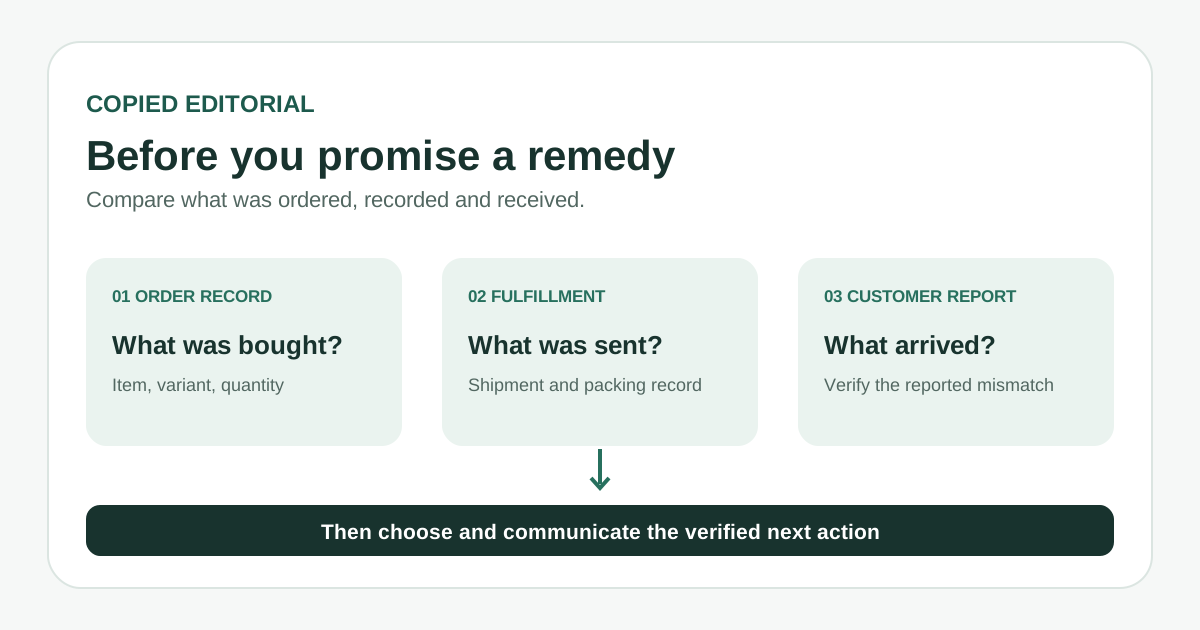
Compare the three records
| Record | Check | Do not assume |
|---|---|---|
| Order | The purchased product, variant, quantity and any later order changes | The original cart always matches the final order |
| Shipment | The fulfillment and packing record for this particular parcel | A printed slip proves what was physically packed |
| Customer report | Which item or variant the customer says arrived | A mismatch is a preference-based return or the customer's mistake |
Shopify's order-document guidance says a packing slip lists the items sent in a particular shipment; an order can have more than one shipment. Find the slip for the parcel in question. If your business uses pick lists or scan checks, compare those records too. Shopify's batch-fulfillment guide describes pick lists and scan verification, but those steps depend on the merchant's workflow. None replaces a careful review of the customer's report.
A practical first-response sequence
- Locate the order through your authorized store workflow. Compare the purchased item and variant with the relevant fulfillment and packing record. If there were multiple shipments, identify the parcel involved before drawing a conclusion.
- Ask for only the details needed to identify the discrepancy, through your normal private support channel. A clear description of the received product or variant may be enough; request a photo only if it helps your process. Do not ask for payment details or publish an order address in a public thread.
- Acknowledge the report without assigning fault. Say which record you will check and when the customer can expect your next update only if you can meet that timing.
- Review available stock, your store's policy and any applicable obligations. Decide whether the appropriate path is a corrected item, exchange, return, refund or another approved resolution. Do not assume that creating a return reserves stock or ships an exchange.
- After the decision is authorized, record the actual action in your store tools. Send return instructions or a label only when available. Say a corrected item has shipped only after fulfillment exists, and include tracking only after it is generated.
A wrong item is different from a missing parcel or a preference-based return. If the order was delivered but no parcel was found, use the delivered-but-not-received guide. For a routine return request, use the return-request guide.
What to say before a remedy is confirmed
Keep the first reply short and specific. Fictional example: ‘Hi Alex, thank you for telling us the item in your parcel does not match your order. I am checking the order and shipment record now. Could you confirm the product and size or color you received through this support thread? I will update you after I have checked the available resolution.’ Replace the example name and details in a real message. This acknowledgment does not claim that a replacement or refund has already been approved.
- If you have confirmed the mismatch but are still deciding the remedy, say that you have confirmed it and are reviewing the next step. Do not describe an exchange as shipped.
- Once a corrected item is actually fulfilled, give its verified tracking link and distinguish it from the original parcel.
- If a return is required under the approved resolution, explain the actual instructions and who will provide the label. Avoid inventing a deadline, charge or pickup.
Shopify's return and exchange guidance separates creating a return from processing it. For an exchange item, fulfillment is another step. It also lists item and staff-permission limits. Check the applicable record before telling the customer that money has been refunded or another item has been sent.
Reuse only the stable wording
Copied's product page describes saved text Keys that can be inserted in compatible iPhone and iPad text fields, then reviewed, personalized and sent by the person writing. A reusable Key could hold the neutral acknowledgment and a reminder to check the order, shipment and customer report. Add the recipient, order-specific facts and approved next step separately. Do not put names, addresses, order numbers or SKU details into a reusable Key. Copied does not inspect Shopify records, choose remedies, create returns, ship items or send messages automatically; secure fields and some apps may not accept third-party keyboards.
Keep the order and resolution in your merchant system. If this kind of acknowledgment is repeated often, see whether Copied fits your iPhone or iPad reply workflow.
References
- Shopify Help Center, Printing order documents Packing slips concern a particular shipment; orders can have multiple shipments. Official Shopify; checked Nov21, 2026; no order test.
- Shopify Help Center, Fulfilling orders in batches Pick lists and scan verification depend on merchant workflow. Official Shopify; checked Nov21, 2026; no account test.
- Shopify Help Center, Creating returns and exchanges Creating versus processing a return, exchange fulfillment and item/permission limits. Official Shopify; checked Nov21, 2026; no return test.
- Copied, product homepage Manual reusable Keys in compatible iPhone/iPad text fields; no store integration. Checked Nov21, 2026; no device test.