App Reviews
Google Voice vs WhatsApp Business on iPhone: Which Client Contact Route Fits?
Choose the contact route your clients can use and your business can actually monitor. A work number and an app chat solve different parts of the job.
Published , 5 min read, by Copied Editorial team
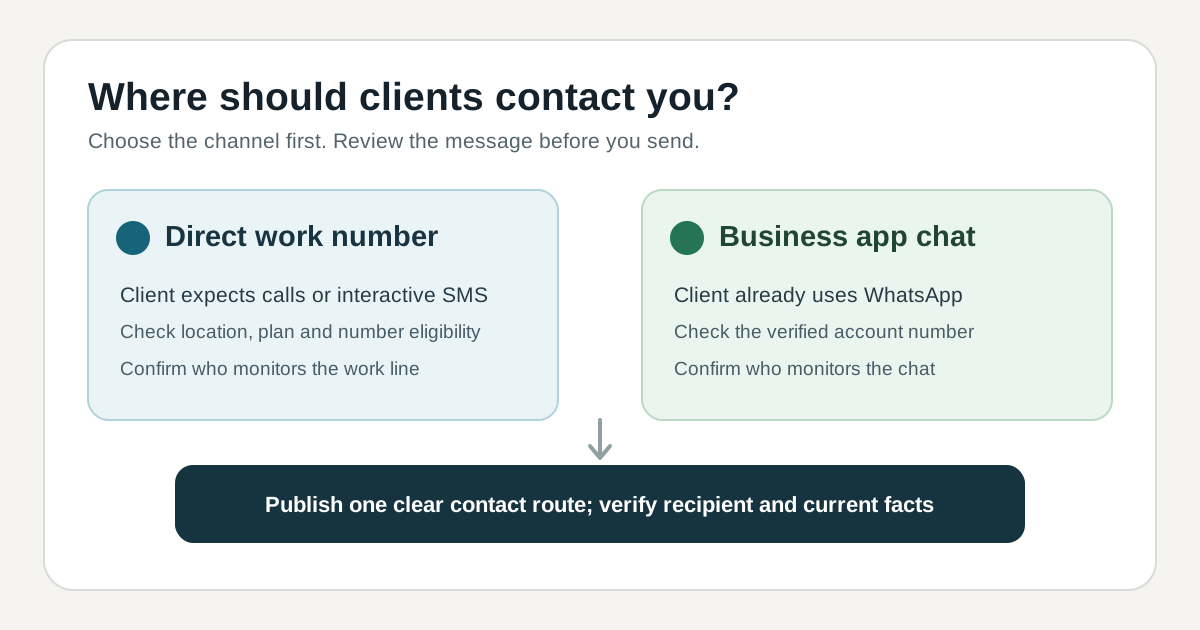
For a US small business whose customers expect to call or text a work number, start by evaluating Google Voice's business subscription. If the customer already wants to talk in WhatsApp, evaluate the WhatsApp Business app and its chat tools. These are different contact routes: a Voice number does not turn a conversation into a WhatsApp chat, and a WhatsApp chat is not ordinary SMS. Choose the route clients will use and someone on your side will answer.
This is a documentation-based comparison for a US solo owner using an iPhone. We checked Google's and WhatsApp's official help and plan pages on November 11, 2026. We did not create either account, obtain a number, place a call, send a client message or test either app with Copied. Current availability and plan terms can change; check your actual account and region before putting a new contact route on customer materials.
Compare the contact job
| Decision | Google Voice business subscription | WhatsApp Business app |
|---|---|---|
| How a client starts | Calls or interactive texts to a Voice number; useful when a phone number is the expected contact route. | A chat in WhatsApp; useful when the customer is willing to use that app. |
| iPhone workflow | Google documents an iPhone/iPad Voice app for texting; its business plan table lists mobile apps and voicemail features. | WhatsApp documents an iPhone Business app with a business profile, lists and messaging tools. |
| Plan and access | Business Voice plans are paid. Google's separate basic personal version is not the same plan. Paid-subscription SMS is US-only. | The Business app is free to download. It is distinct from the Business Platform and requires phone-number verification. |
| Key limit | Google says Voice texts are for interactive conversations, not bulk or repeated broadcasts. | The Business app does not let the same number run personal WhatsApp and WhatsApp Business at once. |
The table describes vendor documentation, not a hands-on score. Before comparing extra features, ask whether the client needs a number they can call, or whether the conversation can stay inside an app they already use. Publishing both as interchangeable contact options can create a second inbox that nobody owns.
When a direct work number is the better starting point
Google's current Voice subscription table lists business subscriptions for individuals and organizations, with iPhone/iPad mobile apps and calling features. Its basic free personal Voice version is separate from the paid business plans; do not assume a personal account includes business-plan controls. The plan table distinguishes standalone and Workspace add-on eligibility, so confirm the plan you can actually buy before advertising the number.
Google's iPhone texting guide says paid-subscription texting is available only in the US and treats Voice messages as interactive conversations. Google warns that bulk or repetitive sending can be blocked; short-code texts and some service verification messages may not work. Voice is not iMessage. A Voice number can be useful for client calls and individual follow-ups, but it is not a bulk-reminder service. Check the receiving and reply path with your own account before putting the number on a booking page.
When a Business app chat is the better starting point
WhatsApp's Business app overview describes an iPhone app with a business profile, lists and messaging tools. The app is free to download; that statement does not describe every optional feature or the separate Business Platform. If clients already start conversations in WhatsApp, the app's own organization and reply tools may be enough without a second phone-number-based messaging workflow.
WhatsApp's iPhone setup guide requires a verified phone number. It says personal WhatsApp and WhatsApp Business can run at the same time only with different numbers, or an existing account can be migrated. Decide what number the business will use before moving a personal chat history. Do not assume a Google Voice number can register the WhatsApp account; this guide does not establish that combination.
Try a contact-route exercise before changing your website
Imagine a fictional repair shop where some customers call about an urgent visit and others send photos in WhatsApp. This is a planning example, not a tested shop or customer result. Write down the following before publishing a new contact option:
- For each kind of enquiry, note whether a customer needs to call a conventional number or is happy to open a WhatsApp chat.
- Name the person who checks each route during business hours and how missed contacts are handled. If nobody owns a second inbox, do not advertise it yet.
- Test the exact contact route from a separate phone or account you control. Check the displayed business identity, delivery path and how a client can reply.
- Update one customer-facing page at a time, then check that its phone number or WhatsApp link leads to the intended destination.
A comparison page cannot tell you which channel your own customers prefer. The useful result of this exercise is one contact route that reaches a monitored inbox, plus a clear reason to add another only when you can support it.
Keep reusable wording separate from the channel
The channel app remains responsible for calls or messages. If you repeatedly write the same approved answer in several compatible iPhone or iPad text fields, Copied's product description offers Keys for manually inserting reviewed wording. It does not provide a business number, operate a WhatsApp account, route enquiries, send messages or track delivery. We have not verified keyboard insertion inside either compared app; test your actual destination first. If your work stays in WhatsApp and its own reply tools cover the job, use those tools.
For the WhatsApp-only reuse workflow, see our WhatsApp Business Quick Replies guide. If you need a shareable chat entry point after choosing WhatsApp, use the Business short-link guide. If you still need a separate manual library for recurring wording, review what Copied can store and insert before trying it in a compatible field.
References
- Google Workspace Help, Compare Voice subscriptions Business subscriptions are paid, separate from basic free personal Voice; table lists plan eligibility, US-only paid SMS, mobile apps and calling features. Google; named author/update date unstated; checked Nov11, 2026; no account test.
- Google Voice Help, Send and get text messages on iPhone and iPad iPhone Voice app messaging; paid Voice SMS US-only, interactive rather than bulk, short-code/iMessage limits. Google; named author/update date unstated; checked Nov11, 2026; no device or message test.
- WhatsApp Help Center, About WhatsApp Business Free-to-download iPhone Business app with profile, lists and messaging tools; separate from Messenger. WhatsApp/Meta; named author/update date unstated; checked Nov11, 2026; no account test.
- WhatsApp Help Center, Download the WhatsApp Business app on iPhone Phone-number verification; personal and Business apps require separate numbers if simultaneous; app/Platform distinction. WhatsApp/Meta; named author/update date unstated; checked Nov11, 2026; no account test.
- Copied, product homepage Publisher-declared manual Keys reuse in compatible iPhone/iPad fields; no verified insertion inside Google Voice or WhatsApp Business. Sharply Labs; checked Nov11, 2026; no app test.